
SETUP
SETUP shows the drive program, the ESP® (Electronic Stability Program) mode and the SPORT handling mode.
 Press
Press
 or
or
 on the steering wheel
to select the AMG menu.
on the steering wheel
to select the AMG menu.
Press the
 button repeatedly until
SETUP is displayed.
button repeatedly until
SETUP is displayed.
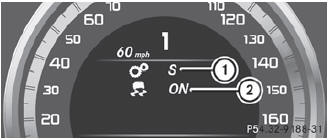
1 Drive program (C/S/S+/M)
2 ESP® mode (ON/OFF) or SPORT handling
mode (SPORT)
See also:
Windows fogged up on the outside
- Activate the windshield wipers.
- Press the button repeatedly
until the
or
symbol appears in the
display.
You should only select this setting until
the windshield is clear again. ...
Important safety notes
Important safety notes
Do not leave the SmartKey in the cargo
compartment. You could otherwise lock
yourself out
WARNING
When leaving the vehicle, always remove the
SmartKey from the ...
Transmission position display
The current transmission position is shown in
the multifunction display.
1 Transmission position
The arrows in the transmission position
display show how and into which
transmission position ...