
Route guidance inactive
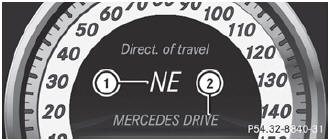
Route guidance inactive
1 Direction of travel
2 Current road
See also:
Problems with the seat heating
If one or all of the indicator lamps in the seat
heating button are flashing, the seat heating
has switched off automatically. The vehicle's
electrical system voltage is too low because
too many e ...
DOT (Department of Transportation)
DOT marked tires fulfill the requirements of
the United States Department of
Transportation. ...
Setting climate control to automatic
WARNING
If you switch off the cooling function, the vehicle will not be cooled when weather
conditions are warm. The windows can fog up more quickly. Window fogging may impair
visibility and ...