
Standard display
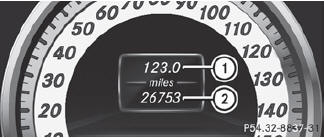
 Press and hold the
 button on the
steering wheel until the Trip menu with
odometer 1 and trip odometer 2 is
shown.
button on the
steering wheel until the Trip menu with
odometer 1 and trip odometer 2 is
shown.
See also:
Derestricting the shift range
Briefly press the selector lever
to the right towards D+.
or
Pull the right-hand steering wheel
paddle shifter.
The shift range is derestricted. ...
Cruise control
Important safety notes
Cruise control maintains a constant road
speed for you. It brakes automatically in order
to avoid exceeding the set speed. On long and
steep downhill gradients, especially i ...
Rear window defroster
Activating/deactivating
WARNING
Any accumulation of snow and ice should be
removed from the rear window before driving.
Visibility could otherwise be impaired,
endangering you and o ...