
Menu overview
The number of menus shown depends on the optional equipment in the vehicle.
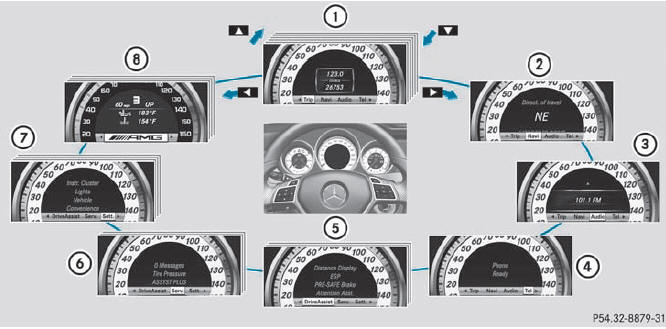
Function
1 Trip menu
2 Navi menu (navigation details)
3 Audio menu
4 Tel menu (telephone)
5 DriveAssist menu (assistance)
6 Serv. menu
• calls up display messages
• tire pressure loss warning system (Canada only)
• tire pressure monitor
• ASSYST PLUS service interval display
7 Sett. menu
8 AMG menu in AMG vehicles
The Audio and Tel menus differ slightly in vehicles with an audio system and vehicles with COMAND. The examples given in this Operator's Manual apply to vehicles equipped with COMAND.
See also:
ADAPTIVE BRAKE
ADAPTIVE BRAKE enhances braking safety
and offers increased braking comfort. In
addition to the braking function, ADAPTIVE
BRAKE also has the HOLD function and hill start assist. For further inf ...
Trip computer "From start" or "From
reset"
The values in the From Start submenu are
calculated from the start of a journey, while
the values in the From Reset submenu are
calculated from the last time the submenu
was reset.
– Press th ...
Warning and indicator lamps
Warning and indicator lamps
Function
1 ESP®
SPORT handling
mode in AMG vehicles
2 Distance warning
3 ESP® OFF
4 Brakes (USA only)
5 Brakes (Canada only)
6 Turn s ...