
Warning and display messages in the multifunction display
 Activate ATTENTION ASSIST using
the onboard
computer.
Activate ATTENTION ASSIST using
the onboard
computer.
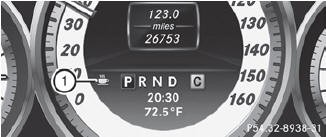
Symbol 1 appears in the multifunction
display.
If ATTENTION ASSIST is active, you will be warned no sooner than 20 minutes after your journey has begun. You will then hear an intermittent warning tone twice, and the Attention Assist: Drowsiness Detected message appears in the multifunction display.
If necessary, take a break.
Press
 to confirm the message.
On long journeys, take regular breaks in good time to allow yourself to rest properly. If you do not take a break and ATTENTION ASSIST still detects typical indicators of fatigue or increasing lapses in concentration, you will be warned again after 15 minutes at the earliest.
ATTENTION ASSIST is reset when you
continue your journey and starts assessing
your tiredness again if:
• you switch off the engine.
• you take off your seat belt and open the
driver's door, e.g. for a change of drivers or
to take a break.
See also:
Snow chains
For safety reasons, Mercedes-Benz
recommends that you only use snow chains
which have been specially approved for your
vehicle by Mercedes-Benz, or are of a
corresponding standard of quality.
...
Digital speedometer
Press the or
button on the steering wheel to
select the Trip menu.
Press or
to select the digital speedometer.
...
Cleaning the headliner and carpets
Headliner: use a soft brush or a cleaning
agent recommended and approved by
Mercedes-Benz to remove heavy soiling.
Carpets: use the carpet and textile
cleaning agents recommended ...