
Deactivating/activating PARKTRONIC
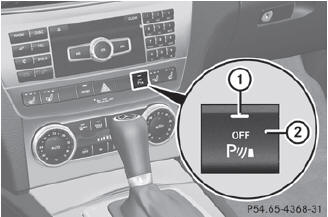
Deactivating/activating PARKTRONIC
1 Indicator lamp
2 To deactivate/activate PARKTRONIC
If indicator lamp 1 lights up, PARKTRONIC is deactivated. Parking Guidance is also deactivated.
 PARKTRONIC is automatically
activated
when you turn the SmartKey to position 2
in the ignition lock.
PARKTRONIC is automatically
activated
when you turn the SmartKey to position 2
in the ignition lock.
See also:
Route guidance active
No change of direction announced
Distance to the destination
Distance to the next change of direction
Current road
Symbol for "follow the road's course"
Change of directio ...
Useful information
This Operator's Manual describes all
models and all standard and optional
equipment of your vehicle available at the
time of publication of the Operator's
Manual. Country-specific differences ...
Important safety notes
WARNING
To help avoid personal injury during a collision
or sudden maneuver, exercise care when
storing objects in the vehicle. Put luggage or
cargo in the trunk if possible.
Do not pile lug ...