
Warning displays
The warning displays show the distance between the sensors and the obstacle. The warning display for the front area is located on the dashboard above the center air vents.
The warning display for the rear area is located on the headliner in the rear compartment.
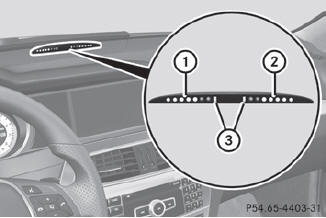
Warning display for the front area
1 Segments on the left-hand side of the vehicle
2 Segments on the right-hand side of the vehicle
3 Segments showing operational readiness
The warning display for each side of the vehicle is divided into five yellow and two red segments. PARKTRONIC is operational if yellow segments showing operational readiness 3 light up.
The selected transmission position determines which warning display is active when the engine is running.
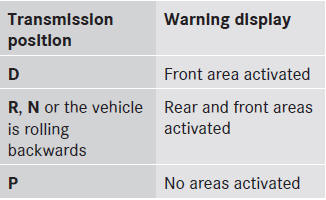
One or more segments light up as the vehicle approaches an obstacle, depending on the vehicle's distance from the obstacle.
From the:
• sixth segment onwards, you will hear an
intermittent warning tone for
approximately two seconds.
• seventh segment onwards, you will hear a
warning tone for approximately two
seconds. This indicates that you have now
reached the minimum distance.
See also:
Lowering the vehicle
► Place the ratchet wrench onto the
hexagon
nut of the jack so that the letters AB are
visible.
► Turn the ratchet wrench until the vehicle
is
once again standing firmly on the gro ...
Changing the settings of the locking system
You can change the setting of the locking
system in such a way that only the driver's
door and the fuel filler flap are unlocked. This
is useful if you frequently travel on your own.
To change ...
Cleaning the paintwork
Scratches, corrosive deposits, areas affected
by corrosion and damage caused by
inadequate care cannot always be completely
repaired. In such cases, visit a qualified
specialist workshop, e.g. ...