
Range of the sensors
General notes
The sensors must be free of dirt, ice and slush; otherwise they may not function correctly. Clean the sensors regularly, taking care not to scratch or damage them.
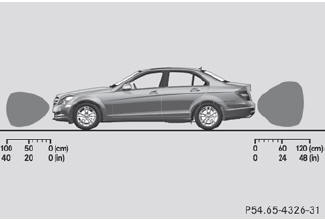
Side view
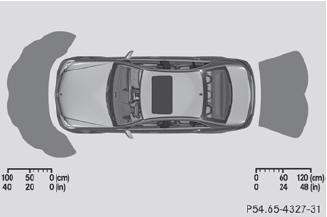
Top view
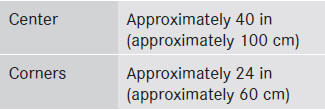
Front sensors
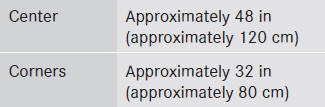
Rear sensors
 When parking, pay particular
attention to
objects above or below the sensors, such
as flower pots or trailer drawbars.
When parking, pay particular
attention to
objects above or below the sensors, such
as flower pots or trailer drawbars.
PARKTRONIC does not detect such objects
when they are in the immediate vicinity of
the vehicle. You could damage the vehicle
or the objects.
The sensors may not detect snow and other
objects that absorb ultrasonic waves.
Ultrasonic sources such as an automatic
car wash, the compressed-air brakes on a
truck or a pneumatic drill could cause
PARKTRONIC to malfunction.
PARKTRONIC may not function correctly on
uneven terrain.
Minimum distance
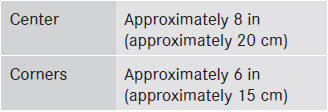
If there is an obstacle within this range, the relevant warning displays light up and a warning tone sounds. If the distance falls below the minimum, the distance may no longer be shown.
See also:
Standard display
Press and hold the
button on the
steering wheel until the Trip menu with
odometer 1 and trip odometer 2 is
shown. ...
Safety notes
WARNING
Work improperly carried out on electronic
components and associated software could
cause them to cease functioning. Because the
vehicle's electronic components are
interconnected, a ...
MOExtended tires (tires with run-flatproperties)
MOExtended tires (tires with run-flat
properties) allow you to continue driving your
vehicle even if one or more tires are entirely
deflated.
MOExtended tires may only be used in
conjunction wi ...