
DISTRONIC PLUS displays in the speedometer
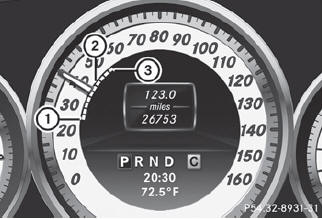
When DISTRONIC PLUS is activated, one or two segments 2 in the set speed range light up.
 For design reasons, the speed
displayed
in the speedometer may differ slightly from
the speed set for DISTRONIC PLUS.
For design reasons, the speed
displayed
in the speedometer may differ slightly from
the speed set for DISTRONIC PLUS.
If DISTRONIC PLUS detects a vehicle in front, segments 2 between speed of the vehicle in front 1 and stored speed 3 light up.
See also:
General information
WARNING
All categories of messages contain important information which should be taken
note of and,
where a malfunction is indicated, addressed as soon as possible at an authorized
M ...
Assistants to see and be seen better
The Adaptive High Beam Assist system is now offered as standard equipment on
the Mercedes-Benz CL-Class. This camera-based system can recognize oncoming
vehicles or vehicles ahead with their light ...
Maximum gradient-climbing capability
For good road surface conditions, the
maximum gradient-climbing capability is
100%, which corresponds to an approach/
departure angle of 45°. Note that the
vehicle's gradient-climbing capability
...