
Cruise control lever
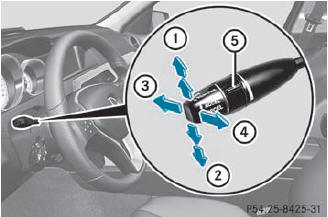
Cruise control lever
1 To store the current speed or a higher speed
2 To store the current speed or a lower speed
3 To deactivate DISTRONIC PLUS
4 To store the current speed or to call up the last stored speed
5 To set the specified minimum distance
See also:
Resetting the panorama roof with power tilt/sliding panel and the roller
sunblinds
Reset the panorama roof with power tilt/sliding panel and the roller
sunblinds if the
panorama roof with power tilt/sliding panel
or the roller sunblinds do not move smoothly.
Turn the SmartKe ...
Ruts and gravel roads
Observe the following rules when driving along ruts in off-road terrain or on
roads with loose gravel:
Check that the ruts are not too deep and that your vehicle has sufficient clearance.
Othe ...
ADAPTIVE BRAKE
ADAPTIVE BRAKE enhances braking safety
and offers increased braking comfort. In
addition to the braking function, ADAPTIVE
BRAKE also has the HOLD function and hill start assist. For further inf ...