
Cruise control lever
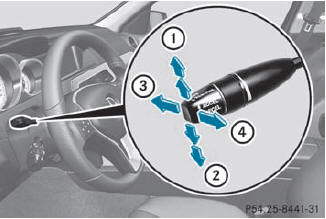
Cruise control lever
1 To switch on or to increase the speed
2 To switch on or to reduce the speed
3 To deactivate cruise control
4 To switch on with the current speed or with the last stored speed
When you activate cruise control, the stored speed is shown in the multifunction display for five seconds. In the multifunction display, the segments between the stored speed and the maximum speed light up.
See also:
General notes
The roller sunblinds shield the vehicle interior
from sunlight. The two roller sunblinds can
only be opened and closed together when the
panorama roof with power tilt/sliding panel
is closed.
...
Important safety notes
Cruise control maintains a constant road
speed for you. It brakes automatically in order
to avoid exceeding the set speed. On long and
steep downhill gradients, especially if the
vehicle is la ...
Washing by hand
In some countries, washing by hand is only
allowed at specially equipped washing bays.
Observe the legal requirements in all
countries concerned.
Do not use hot water and do not wash the ...