
Transmission position and drive program display
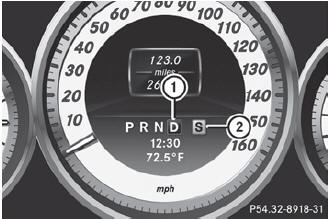
Transmission position and drive program display
1 Transmission position display
2 Drive program display
The current position of the selector lever is shown by the indicators next to the selector lever.
The indicators light up when the SmartKey is inserted into the ignition lock. The indicators go out when the SmartKey is removed from the ignition lock.
See also:
General notes
When you lock the vehicle, you can simultaneously:
close the side windows
close the panorama roof with power tilt/ sliding panel
On vehicles with a panorama roof with power tilt/sliding panel ...
Hazard warning lamps
The hazard warning lamps automatically
switch on if:
• an air bag is deployed.
• the vehicle is slowed down severely from a
speed of over 45 mph(70 km/h) and comes
to a halt.
To switch ...
Setting the rear-compartment air
vents
Setting the center vents in the rear
compartment
1. Rear-compartment air vent thumbwheel
2. Rear-compartment air vent, right
3. Rear control panel for automatic climate
control
4. R ...