
Setting the center air vents
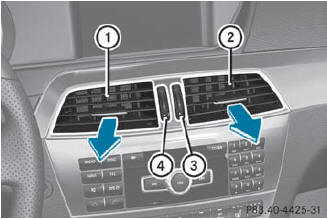
Setting the center air vents
1 Center air vent, left
2 Center air vent, right
3 Center vent thumbwheel, right
4 Center vent thumbwheel, left
 To open/close: turn
thumbwheels 3 and 4 up or down.
To open/close: turn
thumbwheels 3 and 4 up or down.
See also:
Manual interior lighting control
To switch the front interior
lighting on/off: press the c button.
To switch the rear interior
lighting on/off: press the u button.
To switch the reading lamps
on/off: press the p button. ...
Maximum load rating
The maximum load rating in kilograms or
pounds is the maximum weight for which a
tire is approved. ...
Storing the vehicle position in the list of
previous destinations
To activate navigation mode: press the
function button once or twice.
To show the menu: press
the COMAND
controller.
Select Position in the navigation system
menu bar by turning
the ...