
Storing settings
With the memory function, you can store up to three different settings, e.g. for three different people.
The following settings are stored as a single memory preset:
• position of the seat, backrest and head restraint
• driver's side: steering wheel position
• driver's side: position of the exterior mirrors on the driver's and
front-passenger sides
WARNING
Do not activate the memory function while
driving. Activating the memory function while
driving could cause the driver to lose control
of the vehicle.
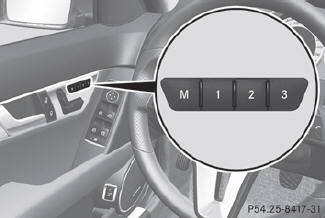
 Adjust the seat.
On the driver's side, adjust the
steering wheel and the exterior mirrors.
Press memory button M and
one of the storage position buttons 1, 2 or 3 within three
seconds.
The settings are stored in the selected preset position. A tone sounds when the
settings have been completed.
See also:
KEYLESS-GO
General information
Vehicles with KEYLESS-GO are equipped with
a SmartKey featuring an integrated KEYLESSGO
function and a detachable Start/Stop
button.
The Start/Stop button must be inserted ...
Cup holder in the front-compartment
center console
You can remove the cup holder to clean it.
Clean with clear, lukewarm water only.
To open: press marking 1.
To remove: slide catch 2 back and pull
the cup holder upwards.
To insert: insert ...
Windows fogged up on the outside
Switch on the windshield
wipers.
Press the
button repeatedly until the
or
symbol appears in the display.
You should only select this
setting until
the windshield is clear again. ...