
Switching on/off
The three blue indicator lamps in the buttons indicate the ventilation level you have selected.
 If the battery voltage is too
low, the seat
ventilation may switch off.
If the battery voltage is too
low, the seat
ventilation may switch off.
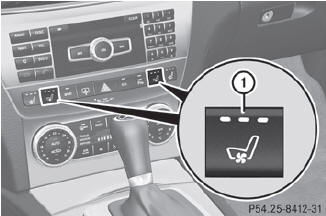
 Make sure that the SmartKey is
in position 2 in the ignition lock.
Make sure that the SmartKey is
in position 2 in the ignition lock.
To switch on: press button 1
repeatedly until the desired ventilation level is set.
You can open the side windows
and the
sliding sunroof using the "Convenience
opening" feature. The seat
ventilation of the driver's seat
automatically switches to the highest level.
To switch off: press
button 1 repeatedly
until all the indicator lamps go out.
See also:
Problems with the windshield wipers
The windshield wipers are obstructed
Leaves or snow, for example, may be obstructing the windshield wiper movement.
The wiper motor has been deactivated.
For safety reasons, you should remove t ...
BAS (Brake Assist System)
Observe the "Important safety notes"
section.
BAS operates in emergency braking
situations. If you depress the brake pedal
quickly, BAS automatically boosts the braking
force, thus s ...
Showing the distance display
This function is only available with
DISTRONIC PLUS.
Press the
or
button on the
steering wheel to select the DriveAssist
menu.
Press the
or
button to select
Distance Display.
Pre ...