
Switching on/off
WARNING
Repeatedly setting the seat heating to level
3 may result in excessive seat temperatures.
The health of passengers that have limited
temperature sensitivity or a limited ability to
react to excessively high temperatures may
be affected or they may even suffer burn-like
injuries. Therefore, do not use seat heating
level 3 repeatedly.
The three red indicator lamps in the button indicate the heating level you have selected.
 If the battery voltage is too
low, the seat
heating may switch off.
If the battery voltage is too
low, the seat
heating may switch off.
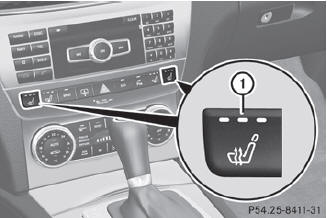
Driver's and front-passenger seat
The system automatically switches down from level 3 to level 2 after approximately eight minutes.
The system automatically switches down from level 2 to level 1 after approximately ten minutes.
The system automatically switches off approximately 20 minutes after it is set to level 1.
 Make sure that the SmartKey is
in position 1 or 2 in the ignition lock.
Make sure that the SmartKey is
in position 1 or 2 in the ignition lock.
To switch on: press button 1
repeatedly until the desired heating level is set.
To switch off: press button
1 repeatedly until all the indicator lamps go out.
See also:
Automatic headlamp mode
► To switch on automatic headlamp
mode: turn the light switch to .
SmartKey in position 1 in the ignition lock:
the parking lamps are switched on or off
automatically depending on the br ...
Stowage compartments in the front
Glove box
The glove box can be cooled.
– To open: pull handle 1 and open glove box
flap 2.
– To close: fold glove box flap 2 upwards
until it engages.
The glove box can only be locked ...
Switching the rear window wiper on/off
Combination switch
1 Rear window wiper switch
2 To wipe with washer fluid
3 To switch on intermittent
wiping
4 To switch off intermittent
wiping
5 To wipe with washer fluid
– Turn the ...