
Operating the panorama roof with power tilt/sliding panel
Opening and closing
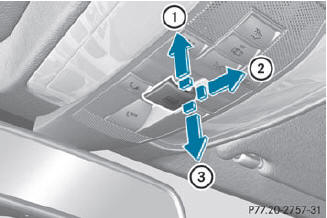
Overhead control panel
1 To raise
2 To open
3 To close/lower
The panorama roof with power tilt/sliding panel can only be operated when the roller sunblind is open.
 Turn the SmartKey to position 1
or 2 in the ignition lock.
Turn the SmartKey to position 1
or 2 in the ignition lock.
Push or pull the
 switch in the corresponding
direction.
switch in the corresponding
direction.
 If you press the
switch beyond the
point of resistance, an automatic opening/closing process is started in the
corresponding direction. You can stop
automatic operation by operating the
switch again.
If you press the
switch beyond the
point of resistance, an automatic opening/closing process is started in the
corresponding direction. You can stop
automatic operation by operating the
switch again.
When raising the roof, automatic operation
is only available if the panorama roof with
power tilt/sliding panel is in the closed
position.
See also:
Under the Hood
The CLS500 gets a 302-hp, 5.0-liter V-8 that works with a
seven-speed-automatic transmission. The CLS55 AMG has a 469-hp, supercharged
5.5-liter V-8 that's connected to a five-speed-automatic tran ...
Important safety notes
WARNING
When expanding the cargo volume, always
fully fold the corresponding seats and, if so
equipped, always use the cargo net when
transporting cargo.
Unless you are transporting cargo, th ...
Tread wear
The tread wear grade is a comparative rating
based on the wear rate of the tire when tested
under controlled conditions on a specified
U.S. Government test course. For example, a
tire graded 1 ...