
Automatic locking feature
The vehicle locks automatically when the ignition is switched on and the wheels of the vehicle are turning at a speed of more than 9 mph (15 km/h).
You could therefore be locked out when:
• the vehicle is being pushed.
• the vehicle is being towed.
• the vehicle is being tested on a dynamometer.
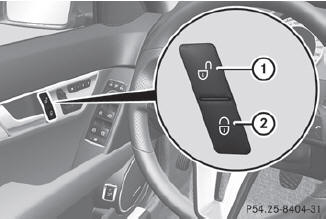
 To deactivate: press and
hold button 1 for about five seconds until a tone sounds.
To deactivate: press and
hold button 1 for about five seconds until a tone sounds.
To activate: press and hold
button 2 for about five seconds until a tone sounds.
 If you press one of the two
buttons and
do not hear a tone, the relevant setting has
already been selected.
If you press one of the two
buttons and
do not hear a tone, the relevant setting has
already been selected.
You can also switch the automatic locking function on and off using the on-board computer.
See also:
Hill start assist
Hill start assist helps you when pulling away
forwards or in reverse on an uphill gradient.
It holds the vehicle for a short time after you
have removed your foot from the brake pedal.
This give ...
Adjusting the seats manually and electrically
Adjusting the seats manually and electrically
1 Backrest angle
2 Seat height
3 Seat cushion angle
4 Seat fore-and-aft adjustment
AMG vehicles are equipped with a
seat
with an integrated he ...
Tires
Problem
Possible causes/consequences and
Solutions
USA
only:
The yellow tire pressure
monitor warning lamp
(pressure loss/
malfunction) is lit.
Canada onl ...