
Removing the mechanical key
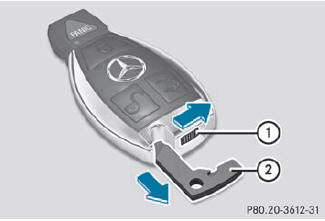
Removing the mechanical key
 Push release catch 1 in the
direction of
the arrow and at the same time, remove
mechanical key 2 from the SmartKey.
Push release catch 1 in the
direction of
the arrow and at the same time, remove
mechanical key 2 from the SmartKey.
See also:
Cleaning the wiper blades
WARNING
Before cleaning the windshield or wiper
blades, switch off the windshield wipers and
remove the SmartKey from the ignition lock.
On vehicles with KEYLESS-GO, press the
Start/Stop b ...
Exhaust check
WARNING
Inhalation of exhaust gas is hazardous to your
health. All exhaust gas contains carbon
monoxide (CO), and inhaling it can cause
unconsciousness and possible death.
Do not run the e ...
New dynamic handling control system: cornering without rolling
Active roll stabilisation in the form of the ACTIVE CURVE SYSTEM can be
optionally combined with both the AIRMATIC air suspension with Adaptive Damping
System (ADS) and the ON&OFFROAD package. ...