
Standard display
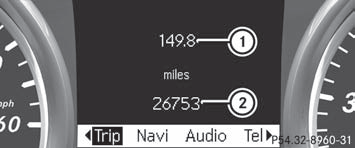
– Press and hold the  button on
the
steering wheel until the Trip menu with
odometer 1 and trip odometer 2 is
shown.
button on
the
steering wheel until the Trip menu with
odometer 1 and trip odometer 2 is
shown.
See also:
Roller sunblind, rear panorama roof
The rear panorama roof roller sunblind
protects the vehicle occupants in the third
row of seats from direct sunlight.
You can open/close the roller sunblind by
hand.
Always guide the roller ...
Capacities
...
Important safety notes
WARNING
Do not park this vehicle in areas where
combustible materials can come into contact
with the hot exhaust system. Combustible
materials, such as grass, hay or leaves could
be ignited ...