
Overview
The on-board computer is activated as soon as you turn the SmartKey to position 1 in the ignition lock.
You can control the multifunction display and the settings in the on-board computer using the buttons on the multifunction steering wheel.
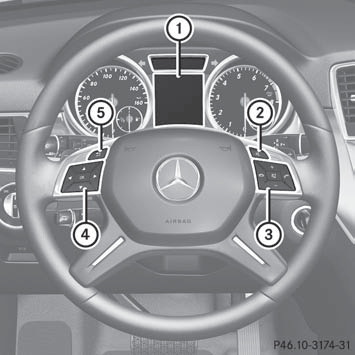
1 Multifunction display
2 To switch on the Voice Control System; see the separate operating
instructions
3 Right control panel
4 Left control panel
5 Back button
See also:
Displays and controls
1 Speedometer with segments
2 Multifunction display
3 Tachometer
4 Coolant temperature
5 Fuel gauge
6 Instrument cluster lighting brightness control: turn clockwise or
counterclockwise ...
Selecting a folder
This function is only available in MP3 mode.
Switch on MP3 mode.
Select Search by sliding and
turning
the COMAND controller and press
to confirm.
Select Folder by sliding and
turning ...
Setting the audio format
This function is not available on all DVDs. If it
is available, you can set the audio language
or the audio format. The number of settings
is determined by the DVD content. It is
possible that ...