
Important notes on the use of KEYLESS-GO
• The KEYLESS-GO key can be used like a conventional key.
• You can combine KEYLESS-GO functions with those of a conventional key, e.g.
unlock with KEYLESS-GO and lock with the
 button.
• Always carry your KEYLESS-GO key on your person.
• Do not keep the KEYLESS-GO key together with:
- electronic devices, e.g. a mobile phone or another key
- metallic objects, e.g. coins or metal foil.
This can affect the functionality of KEYLESS-GO.
• When locking and unlocking using KEYLESS-GO, the distance between the
SmartKey and the corresponding door handle must not exceed 3 ft (1 m).
• If the KEYLESS-GO key is removed from the vehicle, it is possible that the
system may not recognize the SmartKey. The vehicle can then not be locked or
started using KEYLESS-GO.
• If the KEYLESS-GO key has been removed from the vehicle, e.g. if a passenger
leaves the vehicle with a KEYLESS-GO key:
- if the start/stop button is pressed or if an attempt is made to lock the
vehicle with the locking button on the outer door handle, the Key Not
Detected message appears in the multifunction display
- when the engine is running, the red Key Not Detected message appears in
the multifunction display as you pull away.
Find the KEYLESS-GO key and change its position in the vehicle. Carry the
KEYLESS-GO key in your shirt pocket, for example.
• If you have started the engine with the Start/Stop button, you can switch it
off again by:
- pressing the Start/Stop button again
- inserting the KEYLESS-GO key into the ignition lock if the vehicle is
stationary and the automatic transmission is in park position P.
• You could unlock the vehicle by mistake if the distance between the
KEYLESS-GO key and the vehicle is less than 3 ft (1 m) and:
- an exterior door handle is hit by a water jet
or
- you clean an exterior door handle.
• Bear in mind that the engine can be started by any of the vehicle occupants
if there is a KEYLESS-GO key in the vehicle.
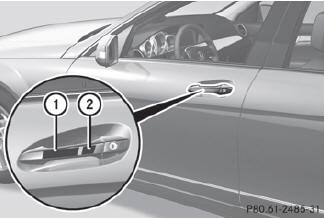
 To unlock the vehicle:
touch the inner surface of the door handle.
To unlock the vehicle:
touch the inner surface of the door handle.
To lock the vehicle: touch
sensor surface 1.
Convenience closing feature:
touch recessed sensor surface 2 for an extended period.
If you pull on the handle of the trunk lid, only the trunk of the vehicle is unlocked.
See also:
Useful information
This Operator's Manual describes all
models and all standard and optional
equipment of your vehicle available at the
time of publication of the Operator's
Manual. Country-specific differences are ...
Setting the center air vents
Setting the center air vents
1 Center air vent, left
2 Center air vent, right
3 Center vent thumbwheel, right
4 Center vent thumbwheel, left
To open/close: turn
thumbwheels 3 and 4 up or dow ...
Notes on regularly inspecting wheels
and tires
WARNING
Regularly check the tires for damage.
Damaged tires can cause tire inflation
pressure loss. As a result, you could lose
control of your vehicle.
Worn, old tires can cause accident ...