
Activating/deactivating the rear view camera
– To activate: make sure that the SmartKey
is in position 2 in the ignition lock.
– Make sure that the "rear view camera"
function is selected in COMAND (see the
separate operating instructions for
COMAND).
– Engage reverse gear.
The area behind the vehicle is shown in the
COMAND display with guide lines.
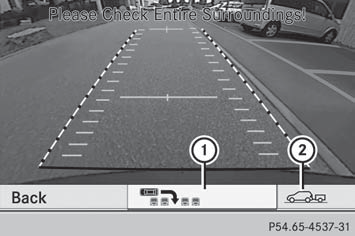
– To change the function mode: using the COMAND controller, select symbol 1 for the "Reverse parking" function or symbol 2 for the "Coupling up a trailer" function. See the separate COMAND operating instructions.
The symbol of the selected function is highlighted.
To deactivate: the rear view camera is
deactivated when you:
- shift the transmission to position P
- drive forward ten meters
- shift the transmission from position R to another position (after 15
seconds)
- drive forward faster than 5 mph (10 km/h)
See also:
Useful information
This Operator's Manual describes
all
models and all standard and optional
equipment of your vehicle available at the
time of publication of the Operator's
Manual. Country-specific differenc ...
Fuel filler flap
The fuel filler flap is unlocked or locked automatically when you open or close
the vehicle with the SmartKey or using KEYLESSGO.
The position of the fuel filler cap is displayed in the instrument ...
Door control panel
1 Opens the door
2 Unlocks/locks the vehicle
3 Adjusts the exterior mirrors
4 Selects the exterior mirror,
electrically folds the exterior mirrors in/out
5 Opens/closes the side window ...