
Cruise control lever
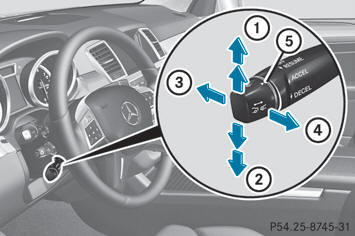
1 To activate or increase speed
2 To activate or reduce speed
3 To deactivate DISTRONIC PLUS
4 To activate at the current speed/last stored speed
5 To set the specified minimum distance
See also:
Important safety notes
WARNING
Follow recommended tire inflation pressures.
Do not underinflate tires. Underinflated tires
wear excessively and/or unevenly, adversely
affect handling and fuel economy, and are
mo ...
Shifting to transmission position D
•► When the vehicle is stationary, depress the
brake pedal.•► Push the DIRECT SELECT lever down past
the first point of resistance. ...
The windshield wipers are obstructed
Leaves or snow, for example, may be
obstructing the windshield wiper movement.
The wiper motor has been deactivated.
For safety reasons, you should remove the
SmartKey from the ignition lock.
...