
NECK-PRO head restraints
 Resetting the NECK-PRO head
restraints
requires a lot of strength. If you have
difficulty resetting the NECK-PRO head
restraints, have this work carried out at a
qualified specialist workshop, e.g. an
authorized Mercedes-Benz Center.
Resetting the NECK-PRO head
restraints
requires a lot of strength. If you have
difficulty resetting the NECK-PRO head
restraints, have this work carried out at a
qualified specialist workshop, e.g. an
authorized Mercedes-Benz Center.
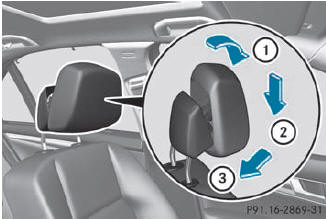
 Tilt the top of the NECK-PRO
head restraint
cushion forwards in the direction of
arrow 1.
Tilt the top of the NECK-PRO
head restraint
cushion forwards in the direction of
arrow 1.
 Push the NECK-PRO head restraint
cushion
down in the direction of arrow 2 as far as
it will go.
Push the NECK-PRO head restraint
cushion
down in the direction of arrow 2 as far as
it will go.
 Firmly push the NECK-PRO head
restraint
cushion back in the direction of arrow 3
until the cushion engages.
Firmly push the NECK-PRO head
restraint
cushion back in the direction of arrow 3
until the cushion engages.
 Repeat this procedure for the
second
NECK-PRO head restraint.
Repeat this procedure for the
second
NECK-PRO head restraint.
See also:
Unlocking and opening doors from
the inside
You can open a door from inside the vehicle
even if it has been locked. You can only open
the rear doors from inside the vehicle if they
are not secured by the child-proof locks.
Only open the ...
Driving over obstacles
Obstacles could damage the floor of the vehicle or components of the chassis.
Ask passengers for guidance when driving over large obstacles. The passenger should
always keep a safe distance fro ...
General information
The program selector button influences:
• the drive program
• the AIRMATIC or ABC suspension settings
• the engine management
Program selector button
Program selector button on AMG vehi ...