
Attaching the cargo net
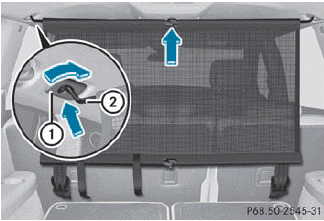
Cargo net attached behind the C-pillar
► Insert guide rod 2 into retainer 1 in
the
direction of the arrow.
► Slide guide rod 2 forwards into
retainer 1 in the direction of the arrow.
See also:
Basic settings
Picture settings
Adjusting the brightness, contrast or
color
Press the COMAND controller to
show
the menu.
Select Video by sliding and
turning
the COMAND controller and press
to c ...
Multifunction steering wheel
Multifunction display
Audio system/ see the separate instructions
Rejects or ends Exits phone
book/ memory
Makes or accepts Switches to the
memory
Adjusts the volume
Mute
S ...
Warning and display messages in the
multifunction display
– Activate ATTENTION ASSIST using the onboard
computer (Y page 232).
Symbol 1 appears in the multifunction
display.
– If necessary, take a break.
– Press or
to confirm the
message.
On l ...