
Overhead control panel
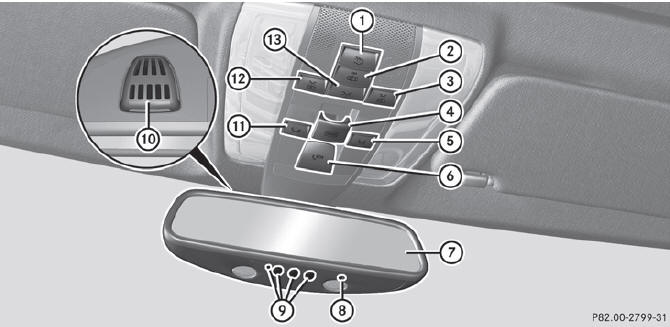
Overhead control panel
Function
1  Switches the rear interior lighting on/off
2  Switches the automatic interior
lighting control on/off
Switches the automatic interior
lighting control on/off
3  Switches the righthand reading
lamp on/off
Switches the righthand reading
lamp on/off
4  Opens/closes the sliding
sunroof
Opens/closes the sliding
sunroof
 Opens/closes the panorama roof with
power tilt/sliding panel and roller sunblinds
Opens/closes the panorama roof with
power tilt/sliding panel and roller sunblinds
5  Button for MB Info call (mbrace
system)
Button for MB Info call (mbrace
system)
6  SOS button (mbrace system)
7 Rear-view mirror
8 Integrated electronic compass
9 Buttons for the garage door opener
10 Microphone for mbrace (emergency call system), telephone and the Voice
Control System
11  Roadside Assistance button
(mbrace system)
Roadside Assistance button
(mbrace system)
12  Switches the lefthand reading
lamp on/off
Switches the lefthand reading
lamp on/off
13  Switches the front interior
lighting on/off
Switches the front interior
lighting on/off
See also:
Overhead control panel
1 Switches the lefthand
reading lamp on/off
2 Switches the front
interior lighting on
3 Switches the rear
interior lighting on/off
4 Switches the front
interior lighting/automatic
i ...
Deactivating DISTRONIC PLUS
Deactivating DISTRONIC PLUS
There are several ways to deactivate DISTRONIC PLUS:
Briefly press the cruise control
lever forwards 1.
or
Brake, unless the vehicle is
stationary.
When you de ...
Important safety notes
Consult an authorized Mercedes-Benz Center
if you require information on approved and
recommended tires and wheels for summer
and winter operation. Advice on purchasing
and caring for tires is ...