
Trip computer "From start" or "Fromreset"
The values in the From Start submenu refer to the start of your journey, while those in the From Reset submenu refer to the last time you reset this submenu.
► Press the
 button on the
steering wheel to select the trip
computer menu.
button on the
steering wheel to select the trip
computer menu.
► Press the
 button to select
From Start or From Reset.
button to select
From Start or From Reset.
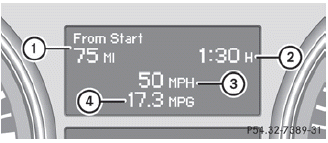
Trip computer "From start" (example)
1 Distance
2 Time
3 Average speed
4 Average fuel consumption
The From Start trip computer is reset automatically when:
• the ignition has been switched off for
more
than four hours.
• 999 hours have been exceeded.
• 9,999 miles have been exceeded.
When 9,999 hours or 99,999 miles have been exceeded, the trip computer is automatically reset From Reset.
See also:
Opening and closing the side trim panels
You must open the side trim panel in the cargo compartment before you can change
the bulbs in the tail lamps.
Left-hand side trim panel
Right-hand side trim panel
To open: turn release kno ...
Activating video DVD mode
Insert a video DVD.
The Rear Seat Entertainment System loads
the disc.
If disc mode was the last mode selected, it
will now be active.
If it was not, switch on video DVD mode as
described in ...
General notes
If the vehicle can no longer be locked or
unlocked with the SmartKey, use the
mechanical key.
If you use the mechanical key to unlock and
open the driver's door or the trunk lid/
tailgate, th ...