
Multifunction display
Values and settings as well as display messages are shown in the multifunction display.
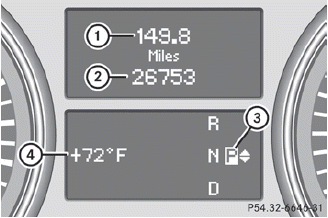
1 Trip odometer
2 Odometer
3 Transmission position
4 Status bar with outside temperature or
speed
For further information on displaying the transmission position, see.
See also:
Preparing the vehicle
WARNING
The wheel and tire size of the emergency
spare wheel/spare wheel may differ to that of
the damaged wheel. When using an
emergency spare wheel/spare wheel the
handling characteristic ...
Important safety notes
WARNING
Make sure absolutely no objects are obstructing the pedals' range of movement.
Keep the driver's footwell clear of all obstacles. If there are any floormats or
carpets in the ...
Convenience opening feature
You can ventilate the vehicle before you start
driving. To do this, the key is used to carry out
the following functions simultaneously:
- unlock the vehicle
- open the side windows
- ope ...