
Displays and controls
Displays and controls
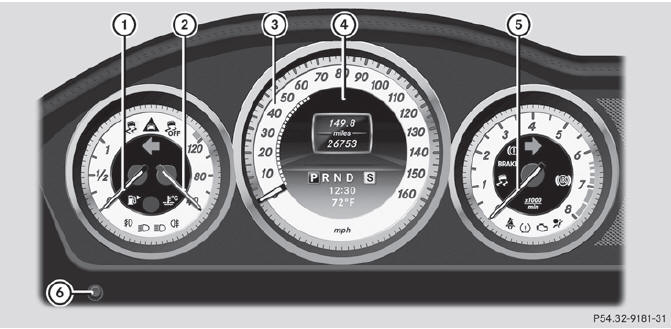
1 Fuel gauge
2 Coolant temperature
3 Speedometer with segments
4 Multifunction display
5 Tachometer
6 Instrument cluster lighting brightness control: turn clockwise or
counterclockwise
See also:
Cruise control lever
1 To activate or increase speed
2 To activate or reduce speed
3 To deactivate cruise control
4 To activate at the current speed/last
stored speed
When you activate cruise control, the stored
...
Setting the airflow
Turn the SmartKey to position 2 in the ignition lock.
To increase/reduce: press the
or
button.
...
Wet roads
WARNING
After driving in heavy rain for some time
without applying the brakes or through water
deep enough to wet brake components, the
first braking action may be somewhat
reduced. You hav ...