
SmartKey
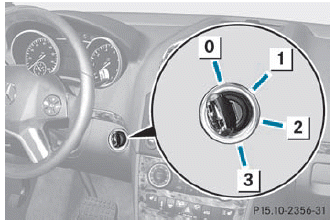
0 To remove the SmartKey
1 Power supply for some consumers, such
as the windshield wipers
2 Ignition (power supply for all consumers)
and drive position
3 To start the engine
 The SmartKey can be turned in the
ignition lock even if it is not the correct
SmartKey for the vehicle. The ignition is not
switched on. The engine cannot be started.
The SmartKey can be turned in the
ignition lock even if it is not the correct
SmartKey for the vehicle. The ignition is not
switched on. The engine cannot be started.
See also:
Cleaning the wiper blades
WARNING
Before cleaning the windshield or wiper
blades, switch off the windshield wipers and
remove the SmartKey from the ignition lock.
On vehicles with KEYLESS-GO, press the
Start/Stop b ...
Basic settings
Picture settings
Adjusting the brightness, contrast or
color
Press the COMAND controller to
show
the menu.
Select Video by sliding and
turning
the COMAND controller and press
to c ...
Windows fogged up on the inside
Activate the cooling with air
dehumidification function via COMAND.
Activate automatic mode .
If the windows continue to fog up, activate
the defrosting function
You should only select this ...