
Unlocking the driver's door(mechanical key)
If the vehicle can no longer be unlocked with the SmartKey, use the mechanical key.
If you use the mechanical key to unlock and open the driver's door, the anti-theft alarm system will be triggered.
► Take the mechanical key out of the
SmartKey.
► Insert the mechanical key into the lock of
the driver's door as far as it will go.
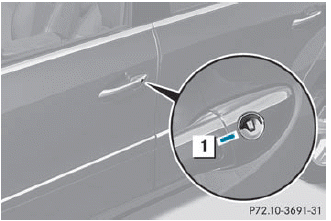
► Firmly turn the mechanical key
counterclockwise
as far as it will go to position
1 and hold it in this position.
► Pull the door handle quickly.
The locking knob pops up.
The door is unlocked.
► Turn the mechanical key back and remove
it.
► Pull the door handle again.
► Insert the mechanical key into the
SmartKey.
See also:
Tires
Problem
Possible causes/consequences and
Solutions
USA
only:
The yellow tire pressure
monitor warning lamp
(pressure loss/
malfunction) is lit.
Canada onl ...
Raising the vehicle
WARNING
When jacking up the vehicle, only use the jack
which has been specifically approved by
Mercedes-Benz for your vehicle.
The jack is designed exclusively for jacking up
the vehicle at ...
Performance
The nice thing about being able to afford the ML550 is the 382-horsepower V-8
under its hood. Calling this SUV "fast" is an understatement. Mercedes says it
goes from zero to 60 mph in 5 ...