
Lowering the vehicle
 WARNING
Pump up the collapsible spare wheel before lowering the vehicle. You could otherwise damage the wheel rim.
- Place the ratchet wrench onto the hexagon nut of the jack so that the letters AB are visible.
- Turn the ratchet wrench until the vehicle is once again standing firmly on the ground.
- Place the jack to one side.
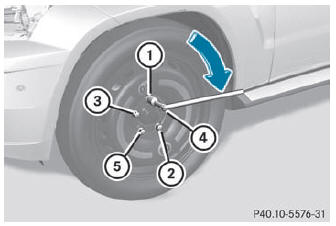
- Tighten the wheel bolts evenly in a crosswise pattern in the sequence indicated (: to A). The tightening torque must be 110 lb-ft (150 Nm).
WARNING
Have the tightening torque checked immediately after a wheel is changed. The wheels could come loose if they are not tightened to a torque of 110 lb/ft (150 Nm).
- Turn the jack back to its initial position and store it together with the rest of the tirechange tool kit in the cargo compartment.
- Transport the defective wheel in the cargo compartment.
For further information on stowing the collapsible spare wheel, see ().
 When you are driving with the collapsible spare wheel mounted, the tire pressure
loss warning system or the tire pressure monitoring system cannot
function reliably. Only restart the tire pressure loss warning system/tire pressure
monitoring system when the defective wheel has been replaced with a new wheel.
When you are driving with the collapsible spare wheel mounted, the tire pressure
loss warning system or the tire pressure monitoring system cannot
function reliably. Only restart the tire pressure loss warning system/tire pressure
monitoring system when the defective wheel has been replaced with a new wheel.
Vehicles with tire pressure monitoring system: all mounted wheels must be equipped with functioning sensors and the defective wheel should no longer be in the vehicle.
See also:
Overview of Tire Quality Grading
Standards
The Uniform Tire Quality Grading is a U.S.
Government requirement. Their purpose is to
provide drivers with consistent and reliable
information regarding tire performance. Tire
manufacturers ...
Calling up the menu of a main function
1 To call up the audio menu
2 Main function bar
If one of the main functions navigation, audio,
telephone or video is switched on,
triangle 1 appears next to the entry. You can
now select ...
Headlamps fogged up on the inside
The headlamps may fog up on the inside if
there is high atmospheric humidity.
•► Drive with the headlamps switched on.
The level of moisture diminishes,
depending on the length of the jour ...