
Changing the battery
You require a CR 2025 3 V cell battery.
- Take the mechanical key out of the SmartKey ().
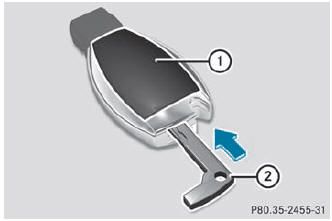
- Press mechanical key 2 into the opening in the SmartKey in the direction of the arrow until battery tray cover 1 opens. When doing so, do not hold cover 1 shut.
- Remove battery tray cover 1.
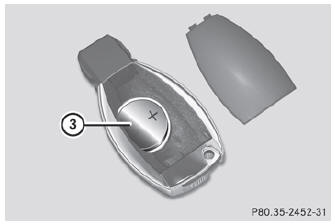
- Repeatedly tap the SmartKey against your palm until battery 3 falls out.
- Insert the new battery with the positive terminal facing upwards. Use a lint-free cloth to do so.
- Make sure that the surface of the battery is free from lint, grease and all other forms of contamination.
- Insert the front tabs of battery tray cover 1 and then press to close it.
- Insert the mechanical key into the SmartKey.
- Check the function of all SmartKey buttons on the vehicle.
See also:
State-of-the-art engine technology from the inventor of the diesel passenger
car
The 2.2-litre CDI engine turns the ML 250 BlueTEC 4MATIC into the most
economical SUV in its class. With NEDC fuel consumption of 6.0 l/100 km, the
model even outperforms any hybrid model currentl ...
Tail lamp
Switch off the lights.
Open the cargo compartment.
Open the side trim panel ().
Pull out connector 2.
Press retaining lugs 1 simultaneously in the direction of the arrow and
pull t ...
Automatic drive program
Drive program E is characterized by the following:
optimal fuel consumption resulting from the automatic transmission shifting
up sooner
the vehicle pulling away more gently in forward and re ...