
Checking the battery
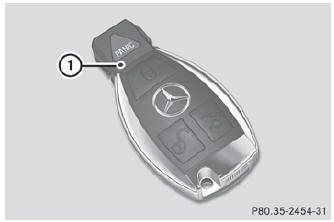
- Press the
 or
or
 button. The battery is working
properly if battery check lamp 1 lights up briefly
button. The battery is working
properly if battery check lamp 1 lights up briefly
If battery check lamp 1 does not light up briefly during the test, the battery is discharged.
- Changing the battery ()
 You can obtain the battery at a qualified specialist workshop.
If the SmartKey battery is checked within the signal reception range of the
vehicle, pressing the or
button locks or unlocks the vehicle.
See also:
General notes
If you use the mechanical key to unlock and
open the driver's door or the trunk lid, the
anti-theft alarm system will be triggered.
There are several ways to turn off the alarm:
To turn the a ...
Introduction
SRS consists of:
• the SRS warning lamp
• air bags
• air bag control unit (with crash sensors)
• Emergency Tensioning Devices
• belt force limiters
SRS reduces the risk of occupants coming
in ...
Cup holder in the rear seat armrest
! Do not sit on or support your body weight
on the rear seat armrest when it is folded
down, as you could otherwise damage it.
! Close the cup holder before folding the
rear seat armrest up. Ot ...