
Cockpit
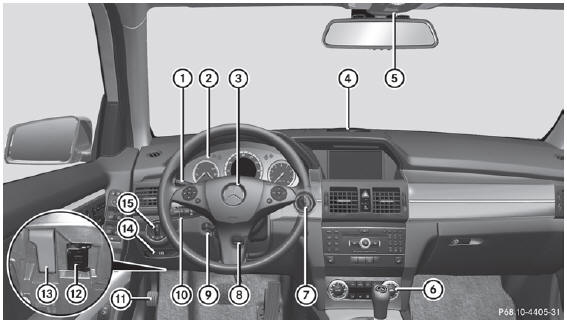
- Cruise control lever
- Instrument cluster
- Horn
- PARKTRONIC warning display
- Overhead control panel
- Operates the climate control system
- Ignition lock
Start/Stop button - Adjusts the steering wheel manually
- Adjusts the steering wheel electrically
- Combination switch
- Parking brake
- On-board diagnostics socket
- Opens the hood
- eleases the parking brake
- Light switch
See also:
Headlamps fogged up on the inside
The headlamps may fog up on the inside if
there is high atmospheric humidity.
- Drive with the headlamps switched on.
The level of moisture diminishes,
depending on the length of the journey and ...
Cup holder in the rear seat armrest
Do not sit on or support your body weight
on the rear seat armrest when it is folded
down, as you could otherwise damage it.
► Fold down the rear seat armrest.
Cup holder 1 is in the r ...
The windshield wipers are inoperative
The windshield wiper drive is malfunctioning.
Select another wiper speed on
the
combination switch.
Have the windshield wipers checked
at a
qualified specialist workshop. ...