
Trip computer "From start" or "From reset
The values in the From Start submenu are calculated from the start of a journey, while the values in the From Reset submenu are calculated from the last time the submenu was reset.
 Press the
  or
or
 button on the
steering wheel to select the Trip menu.
button on the
steering wheel to select the Trip menu.
Press the  or
or
 button to select
From Start or From Reset.
button to select
From Start or From Reset.
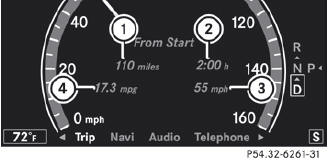
Trip computer "From start" (example)
1 Distance
2 Time
3 Average speed
4 Average fuel consumption
The From Start trip computer is reset automatically if:
• the ignition has been switched off for more than four hours.
• 999 hours have been exceeded.
• 9,999 miles have been exceeded.
When 9,999 hours or 99,999 miles have been exceeded, the trip computer is automatically reset From Reset.
See also:
Operating video DVD
Switch on COMAND and select video DVD (see the separate operating instructions).
Press the or
button on the steering wheel to
select the Audio menu.v
DVD changer display (example)
1 ...
Automatic engine start
The engine is started automatically if you:
• release the brake pedal when HOLD is not
activated and the transmission is in
position D or N
• shift the transmission to position R
• depres ...
Unlocking and opening doors from inside
You can open a door from inside the vehicle
even if it has been locked. You can only open
the rear doors from inside the vehicle if they
are not secured by the child-proof locks.
Only open th ...