
Correct driver's seat position
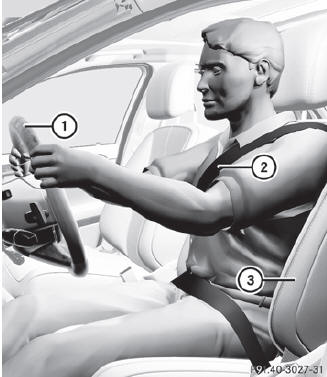
Correct driver's seat position
Observe the safety guidelines on seat adjustment.
 Check whether you have adjusted seat 3
properly.
Check whether you have adjusted seat 3
properly.
Electrical seat adjustment.
When adjusting the seat, make sure:
• you are as far away from the driver's air bag as possible.
• you are sitting in a normal upright position.
• you can fasten the seat belt properly.
• you have moved the backrest to an almost vertical position.
• you have set the seat cushion angle so that your thighs are gently
supported.
• you can depress the pedals properly.
Check whether the head restraint is
adjusted properly.
When doing so, make sure that you have adjusted the head restraint so that the back of your head is supported at eye level by the center of the head restraint.
Observe the safety guidelines on steering wheel adjustment.
Check whether steering wheel 1 is
adjusted properly.
Adjusting the steering wheel electrically.
When adjusting the steering wheel, make
sure:
• you can hold the steering wheel with your
arms slightly bent.
• you can move your legs freely.
• you can see all the displays in the
instrument cluster clearly.
Observe the safety guidelines for seat belts.
Check whether you have fastened seat
belt 1 properly.
The seat belt should:
• fit snugly across your body
• be routed across the middle of your
shoulder
• be routed in your pelvic area across the
hip joints
Before starting off, adjust the rear-view
mirror and the exterior mirrors
in such a way that you have
a good view of road and traffic conditions.
Vehicles with a memory function: save
the seat, steering wheel and exterior mirror
settings.
See also:
Fuel requirements
Gasoline engines
Use only premium-grade unleaded gasoline.
The octane number should be at least 91.
Details can be found on the gas pump. The
octane number is the average value of the
Research ...
Stop function
This function is only available in audio DVD
mode.
Switch on audio DVD mode.
To interrupt playback: select
by
sliding and turning
the COMAND
controller and press to confirm.
The disp ...
System language settings
This function allows you to determine the
language for the menu displays and the
navigation messages. The selected language
affects the characters available for entry.
When you set the system l ...