
Instrument cluster
Displays
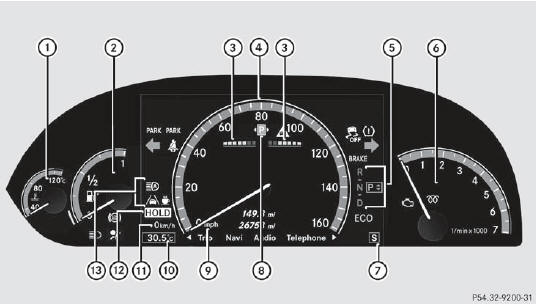
Displays
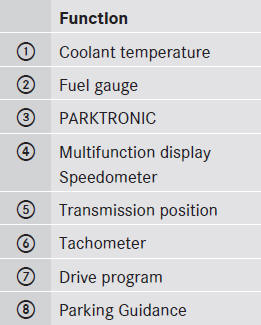
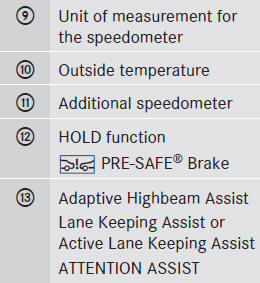
See also:
DVD menu
Calling up the DVD menu
The DVD menu is the menu stored on the DVD
itself. It is structured in various ways
according to the individual DVD and permits
certain actions and settings.
In the cas ...
Adaptive backrest (AMG vehicle)
You can adjust the contour of the front seat
backrests individually so as to provide
optimum support for your back.
Adaptive backrest (AMG vehicle)
1 To adjust the upper back support
2 To adj ...
Important safety notes
The EASY-ENTRY/EXIT feature makes getting
in and out of your vehicle easier.
You can activate and deactivate the EASYENTRY/
EXIT feature in the on-board
computer
WARNING
You must make sur ...