
Overall evaluation
This function is shown if you have stored at least one lap and stopped the RACETIMER.
•► Press  on the steering wheel
to select the AMG menu.
on the steering wheel
to select the AMG menu.
•► Press the  button repeatedly until
the
overall evaluation is shown.
button repeatedly until
the
overall evaluation is shown.
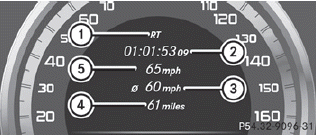
1. RACETIMER overall evaluation
2. Total time driven
3. Average speed
4. Distance covered
5. Top speed
See also:
Radiator
Vehicles with a diesel engine: do not
cover the radiator, for example with a
winter front or bug cover. Otherwise, the
readings of the on-board-diagnostic
system may be inaccurate. Some of these
...
Important safety notes
WARNING
Activate the child-proof locks for the rear
doors and the override switch for the rear
windows when children are traveling in the
vehicle.
Children could injure themselves or other ...
Genuine Mercedes-Benz parts
All Mercedes-Benz Centers maintain a supply
of genuine Mercedes-Benz parts for
necessary service and repair work. In
addition, strategically located parts delivery
centers provide for quick an ...