
Cruise control lever
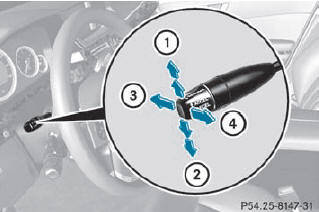
1. To switch on or to increase the speed
2. To switch on or to reduce the speed
3. To deactivate cruise control
4. To switch on with the current speed or
with the last stored speed
When you activate cruise control, the stored speed is shown in the multifunction display for five seconds. In the multifunction display, the segments between the stored speed and the maximum speed light up.
See also:
Opening and closing
You can continue to operate the
sliding
sunroof after switching off the engine or
removing the SmartKey from the ignition
lock. This function is available for up to five
minutes or until th ...
Menu overview
The number of menus shown depends on the optional equipment in the vehicle.
The Audio and Tel menus differ slightly in vehicles with an audio system and
vehicles with COMAND. The examples given ...
Setting a speed
WARNING
Keep in mind that it may take a brief moment
until the vehicle has made the necessary
adjustments.
Increase or decrease the set vehicle speed to
a value that the prevailing road co ...