
Shift ranges
Introduction
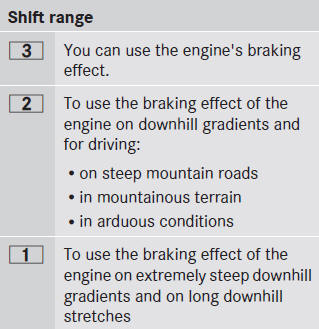
When the automatic transmission is in position D, it is possible to restrict or derestrict the shift range.
The shift range selected is shown in the multifunction display. The automatic transmission shifts only as far as the selected gear.
Restricting the shift range
•► Pull the left-hand steering wheel paddle shifter.
The automatic transmission shifts down one gear and restricts the shift range to the relevant gear.
If the engine exceeds the maximum engine speed when shifting down, the automatic transmission protects against engine damage by not shifting down.
If the maximum engine speed for the shift range is reached and you continue to accelerate, the automatic transmission shifts up in order to prevent the engine from overrevving, even if the shift range is restricted.
Derestricting the shift range
•► Pull the right-hand steering wheel paddle shifter.
The shift range is derestricted.
Clearing the shift range restriction
•► Pull and hold the right-hand steering wheel paddle shifter until D is shown again in the multifunction display.
The automatic transmission shifts from the current shift range directly to D.
Selecting the ideal shift range
•► Pull the left-hand steering wheel paddle shifter and hold it in position.
The automatic transmission shifts to the gear which allows optimum acceleration and deceleration. To do this, the automatic transmission shifts down one or more gears.
See also:
Jump-starting
WARNING
Failure to follow these directions will cause damage to the electronic
components, and can lead
to a battery explosion and severe injury or death.
Never lean over batteries while connec ...
Important safety notes
The fuses in your vehicle serve to close down
faulty circuits. If a fuse blows, all the
components on the circuit and their functions
stop operating.
WARNING
Only use fuses approved b ...
Displaying the range and current fuel
consumption
Press the or
button on the
steering wheel to select the Trip menu.
Press the or
button to select
Range.
The current fuel consumption and the
approximate range are displayed.
The app ...