
Switching the rear window wiper on/ off
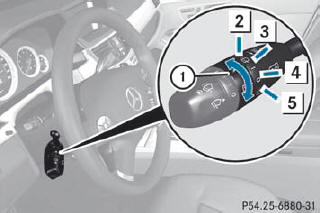
Combination switch
1.  Switch
2.  To wipe with washer fluid
3. I To switch on intermittent wiping
4. 0 To switch off intermittent wiping
5.  To wipe with washer fluid
•► Turn the SmartKey to position 1 or 2 in the ignition lock.
•► Turn switch 1 on the combination switch to the corresponding position.
When the rear window wiper is switched on, the icon appears in the instrument cluster.
See also:
Useful information
This Operator's Manual describes all models and all standard and optional equipment
of your vehicle available at the time of publication of the Operator's Manual. Country-specific
diffe ...
Coupling up a trailer
WARNING
Vehicles with air suspension program: While
you are coupling or decoupling a trailer, make
sure nobody locks or unlocks the vehicle and/or opens or closes doors or the
tailgate.
The v ...
New V8 bi-turbo engine with innovative technology
The new-generation Mercedes-Benz CL-Class also assumes a pioneering role with
its drivetrain. Under the hood of the CL550 4MATIC a new V8 biturbo engine with
BlueDIRECT technology delivers impress ...