
Infrared light (Night View Assist Plus)
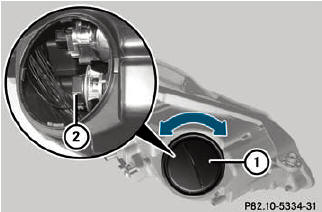
•► Switch off the lights.
•► Open the hood.
•► Turn housing cover 1 counter-clockwise and pull it out.
•► Turn bulb 2 counter-clockwise and pull it out.
•► Insert new bulb 2 and turn it clockwise.
•► Align housing cover 1 and turn it clockwise until it engages.
See also:
Important safety notes
WARNING
Follow recommended tire inflation pressures.
Do not underinflate tires. Underinflated tires
wear excessively and/or unevenly, adversely
affect handling and fuel economy, and are
more ...
Vehicle tool kit
The vehicle tool kit can be found in the
stowage well under the trunk floor/cargo
compartment floor. Depending on the vehicle
equipment, the vehicle tool kit is on the lefthand
side or the rig ...
Massage function (PULSE)
The massage function helps you to prevent
muscle tension on long journeys. You can
choose between two levels.
•► To switch on: press button 4 once or
twice until the desired level is set. ...