
Overview of interior lighting
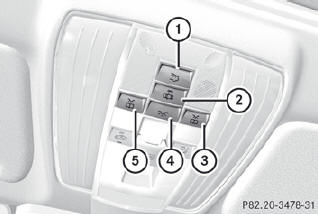
Front overhead control panel
1.  Switches the rear interior
lighting
on/off
Switches the rear interior
lighting
on/off
2.  Switches the automatic interior
lighting control on/off
Switches the automatic interior
lighting control on/off
3.  Switches the right-hand front
reading lamp on/off
Switches the right-hand front
reading lamp on/off
4.  Switches the front interior
lighting
on/off
Switches the front interior
lighting
on/off
5.  Switches the left-hand front
reading
lamp on/off
Switches the left-hand front
reading
lamp on/off
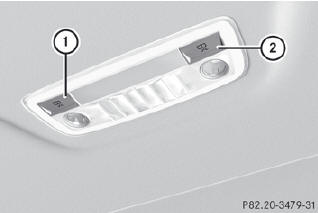
Rear-compartment overhead control panel
1  Switches the right-hand reading
lamp on/off
Switches the right-hand reading
lamp on/off
2  Switches the left-hand reading
lamp
on/off
Switches the left-hand reading
lamp
on/off
See also:
Reporting malfunctions relevant to safety
USA only:
The following text is reproduced as required
of all manufacturers according to Title 49,
Code of U.S. Federal Regulations, Part 575
pursuant to the National Traffic and Motor
Vehicl ...
Resetting
Reset the sliding sunroof if it does not move
smoothly.
Turn the SmartKey to position 2 in the
ignition lock.
Raise the sliding sunroof fully at the rear.
Keep the switch pressed for
...
"Coupling up a trailer" function
This function is only available on vehicles with
a trailer tow hitch.
1 Center of the vehicle on the red guide line
approximately 10 in (0.25 m) away from
the rear area
2 Center of the vehic ...