
Storing settings
With the memory function, you can store up to three different settings, e.g. for three different people.
The following settings are stored as a single memory preset:
- position of the seat, backrest and head
restraint
- active multicontour seat: dynamic function
level
- driver's side: steering wheel position
- driver's side: position of the exterior
mirrors on the driver's and front-passenger
sides
 WARNING
Do not activate the memory function while
driving. Activating the memory function while
driving could cause the driver to lose control
of the vehicle.
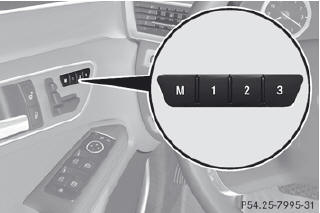
•► Adjust the seat
•► On the driver's side, adjust the steering wheel and the exterior mirro
•► Press memory button M and one of the storage position buttons 1, 2 or 3 within three seconds.
The settings are stored in the selected preset position. A tone sounds when the settings have been completed.
See also:
Opening/closing from the outside
Opening
► Press the
button on the SmartKey.
► Pull handle 1.
► Raise the tailgate.
Closing
WARNING
To prevent possible personal injury, always
keep hands and f ...
General information
If COMAND is equipped with a navigation
system and has GPS reception, COMAND
automatically sets the time and date. You can
also adjust the time yourself in 30-minute
increments, but the date c ...
Setting the audio format
You can only set the audio format in audio
DVD mode. The number of audio formats
available depends on the DVD. The content of
an audio DVD is called an "album", and this
can be divid ...