
Adjusting the active multicontour seat
The active multicontour seat on the driver's side automatically adapts the sides of the backrest to your current driving style. You can adjust the contour of the seats individually so as to provide optimum support for your back and sides.
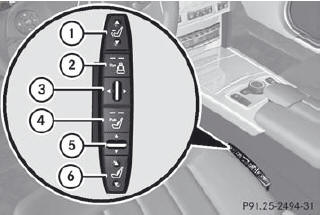
1. To adjust the seat cushion length
2. To switch the dynamic function on or off
3. To adjust the side bolsters of the seat
backrest
4. To switch the massage function on or off
5. To adjust the contour of the backrest to
increase/decrease support
6. To adjust the height/depth of the
backrest contour
See also:
Opening and closing the service flap
You must open the service flap in the cargo
compartment before you can change the
bulbs in the tail lamps.
Left-hand service flap
Right-hand service flap
- To open: release service flap 1 a ...
Folding the seat backrest back
Folding the seat backrest back
Move the driver's or
front-passenger seat
forward if necessary.
Make sure that the seat belt
does not
become trapped when folding the rear seat
backrest ...
Gadgets
The CL's standard equipment list is long. Our test car came with a number of
option packages; here are some of the highlights:
For starters, the blind spot monitors are included in a package that ...