
Opening and closing
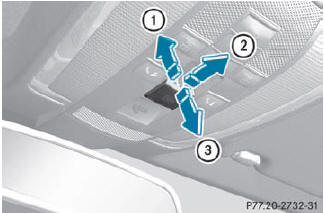
Overhead control panel
1. To open
2. To open
3. To close
•► Turn the SmartKey to position 1 or 2 in the ignition lock.
•► Press or pull the  switch in the
corresponding direction.
switch in the
corresponding direction.
If you press the switch beyond
the
point of resistance, an automatic opening/
closing process is started in the
corresponding direction. You can stop
automatic operation by operating the
switch again.
See also:
Useful information
This Operator's Manual describes
all
models and all standard and optional
equipment of your vehicle available at the
time of publication of the Operator's
Manual. Country-specific differenc ...
Brilliant finish: the rear assembly of the M-Class
The rear area too of the M-Class also protects the sturdy passenger
compartment in crash situations thanks to specific deformation work, therefore
minimising the loads on the occupants. A special ...
NECK-PRO head restraints
Resetting the NECK-PRO head restraints
requires a lot of strength. If you have
difficulty resetting the NECK-PRO head
restraints, have this work carried out at a
qualified specialist workshop ...