
Unlocking the driver's door (mechanical key)
If the vehicle can no longer be unlocked with the SmartKey, use the mechanical key.
If you use the mechanical key to unlock and open the driver's door, the anti-theft alarm system will be triggered.
•► Take the mechanical key out of the SmartKey.
•► Insert the mechanical key into the lock of the driver's door as far as it will go.
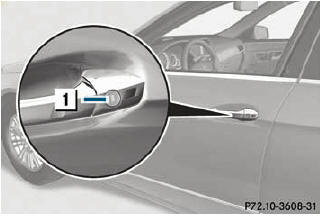
•► Turn the mechanical key counterclockwise
to position 1.
The door is unlocked.
•► Turn the mechanical key back and remove
it.
•► Insert the mechanical key into the
SmartKey.
See also:
Ride & Handling
One of the best aspects of the R350 Bluetec is its comfortable ride. It can
feel floaty on undulating roads and exhibits noticeable body roll when
cornering, but the suspension tuning's emphasis o ...
Closing
WARNING
To prevent possible personal injury, always
keep hands and fingers away from the trunk
opening when closing the trunk lid. Be
especially careful when small children are
around.
...
Outside temperature display
The outside temperature display is in the
multifunction display.
WARNING
The outside temperature indicator is not
designed to serve as an ice-warning device
and is therefore unsuitable for t ...