
Checking the battery
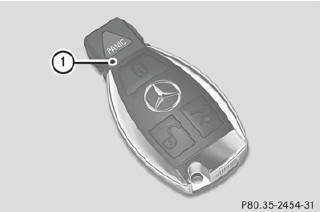
•► Press the  or
or
 button.
The battery is working properly if battery check lamp 1 lights up briefly If battery check lamp 1 does not light up briefly during the test, the battery is discharged.
•► Changing the battery
You can obtain the battery at a qualified specialist workshop.
i If the SmartKey battery is checked within
the signal reception range of the vehicle,
pressing the or
button locks or
unlocks the vehicle.
See also:
Tire labeling overview
The following markings are on the tire in
addition to the tire name (sales designation)
and the manufacturer's name:
1 Uniform tire Quality Grading Standard
2 DOT, Tire Identification Number ...
Comfort on long journeys as standard: the front seats
The seats in the Mercedes-Benz C-Class make a valuable contribution to
comfort on long journeys. As an optional extra, climatised seats are now
available for the driver and front passenger. They e ...
Unlocking the trunk (mechanical key)
The trunk lid swings upwards when
opened. Therefore, make sure that there is
sufficient clearance above the trunk lid.
If the trunk cannot be unlocked with the
SmartKey or KEYLESS-GO, use the ...